<?xml version="1.0" encoding="utf-8"?><?xml-stylesheet type="text/xsl" href="atom.xsl"?>
<feed xmlns="http://www.w3.org/2005/Atom">
    <id>https://public-developer.central.internal.dynatrace.com/blog/</id>
    <title>Dynatrace Developer Portal "What's New"</title>
    <updated>2026-09-17T00:00:00.000Z</updated>
    <generator>https://github.com/jpmonette/feed</generator>
    <link rel="alternate" href="https://public-developer.central.internal.dynatrace.com/blog/"/>
    <subtitle>Stay current on everything new for Dynatrace app creators — features, tools, and platform updates.</subtitle>
    <icon>https://public-developer.central.internal.dynatrace.com/img/favicon.ico</icon>
    <rights>Copyright 2026 Dynatrace LLC. All rights reserved.</rights>
    <entry>
        <title type="html"><![CDATA[More vibrant, more structured, less gray: Strato's fresh, new look is here]]></title>
        <id>https://public-developer.central.internal.dynatrace.com/blog/strato-visual-refresh/</id>
        <link href="https://public-developer.central.internal.dynatrace.com/blog/strato-visual-refresh/"/>
        <updated>2026-09-17T00:00:00.000Z</updated>
        <summary type="html"><![CDATA[Dynatrace gets a visual refresh: now with a clean, line-based layout, outlined input fields, vibrant status colors, and new chart palettes.]]></summary>
        <content type="html"><![CDATA[<p>The Strato visual refresh has rolled out. If you build apps for Dynatrace, your
UI now looks cleaner, calmer, and more modern—without a single line of code
changing on your side. The goal we set at the start was simple: clearer
structure, less gray, and more vibrant colors. Here's what changed:</p>
<h2 class="anchor anchorTargetStickyNavbar_u62B" id="a-page-layout-built-on-lines-not-stacked-surfaces">A page layout built on lines, not stacked surfaces<a href="https://public-developer.central.internal.dynatrace.com/blog/strato-visual-refresh/#a-page-layout-built-on-lines-not-stacked-surfaces" class="hash-link" aria-label="Direct link to A page layout built on lines, not stacked surfaces" title="Direct link to A page layout built on lines, not stacked surfaces" translate="no">​</a></h2>
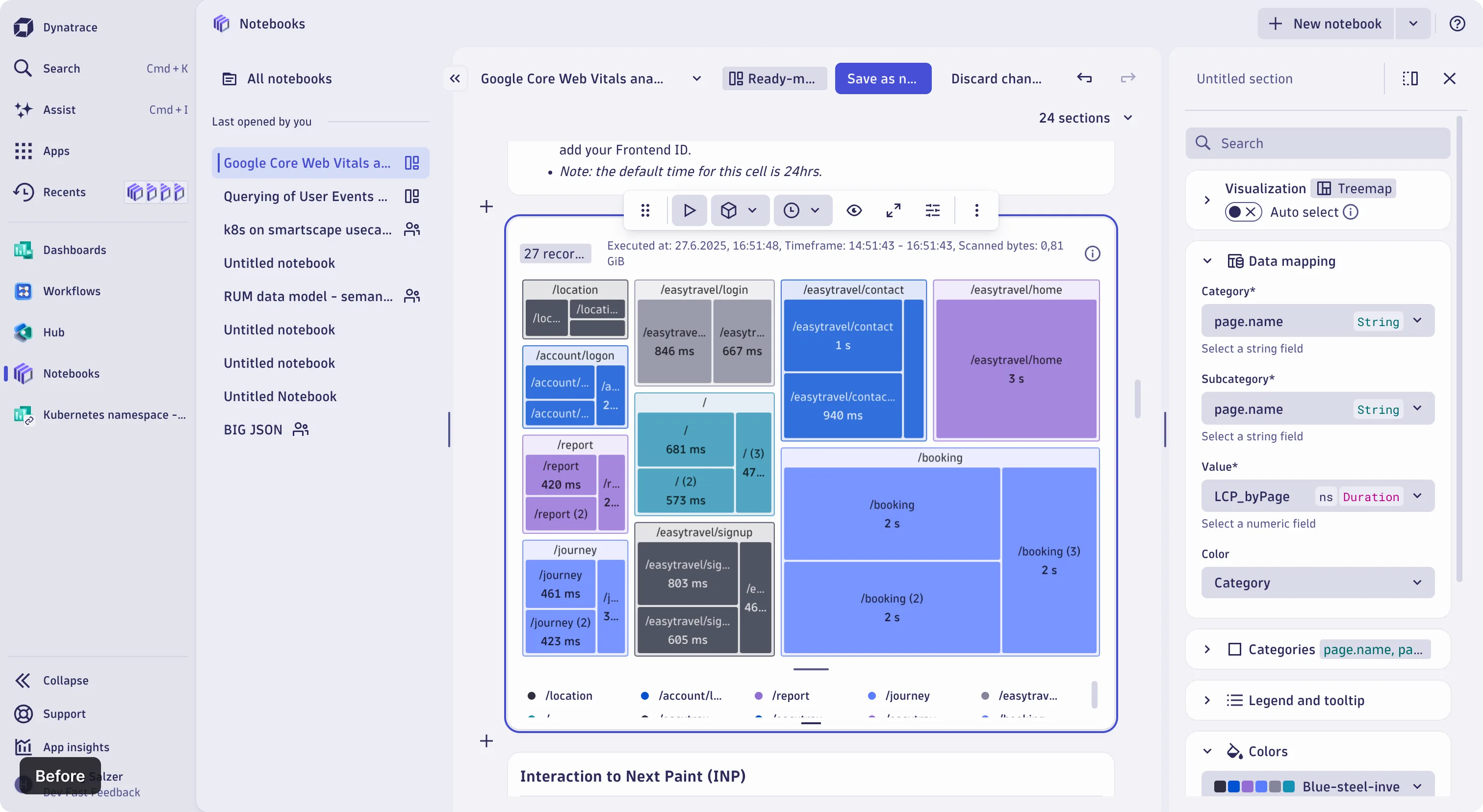
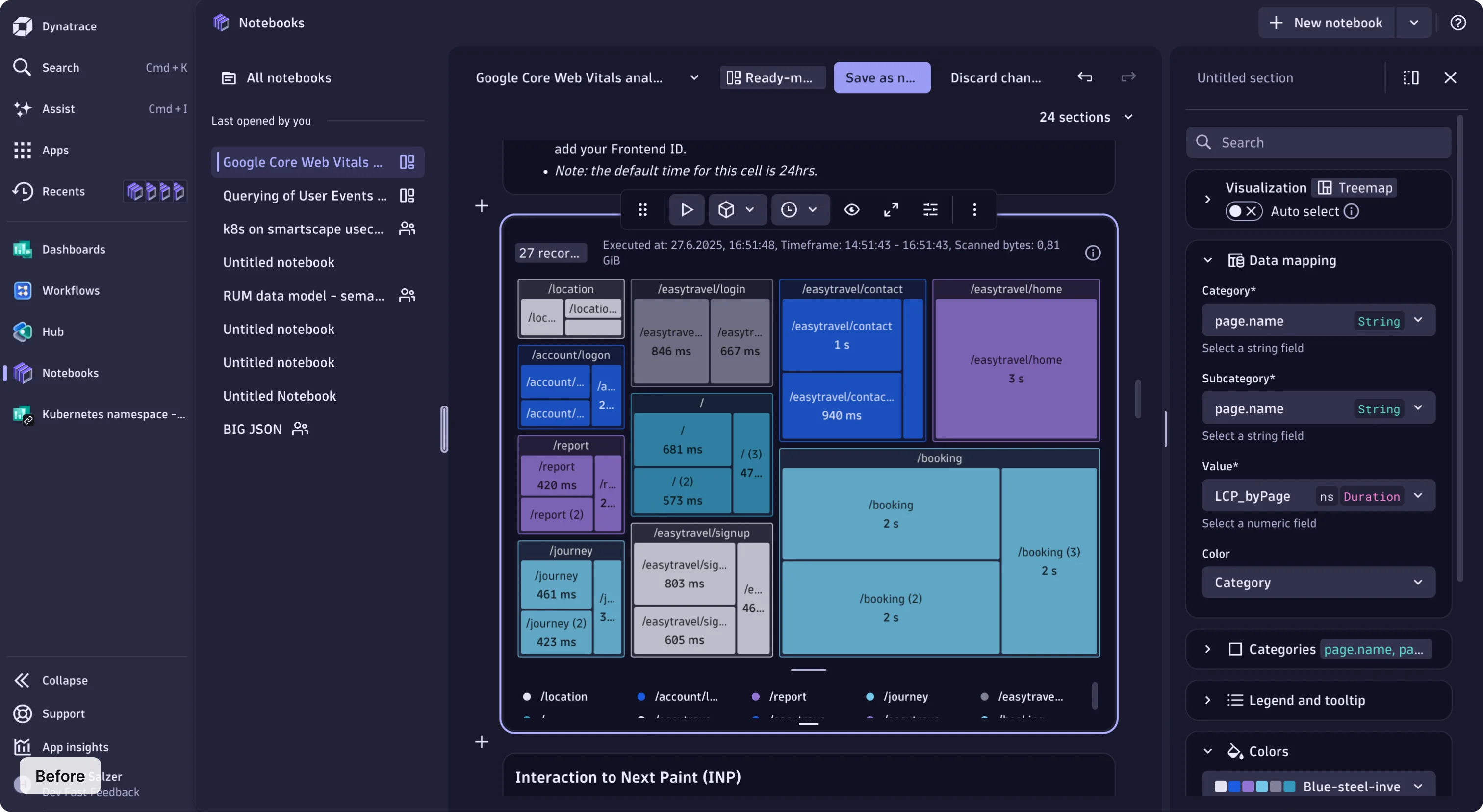
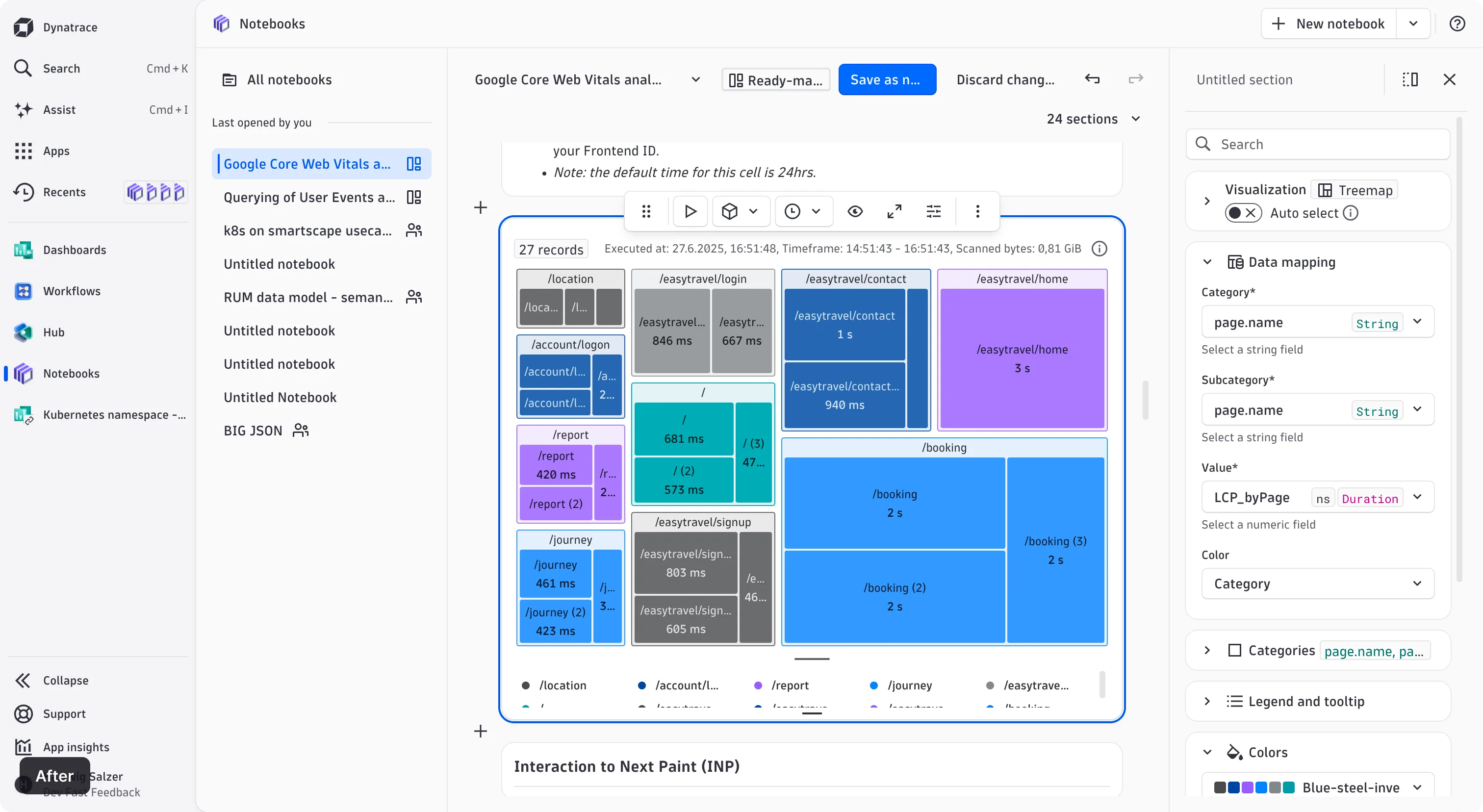
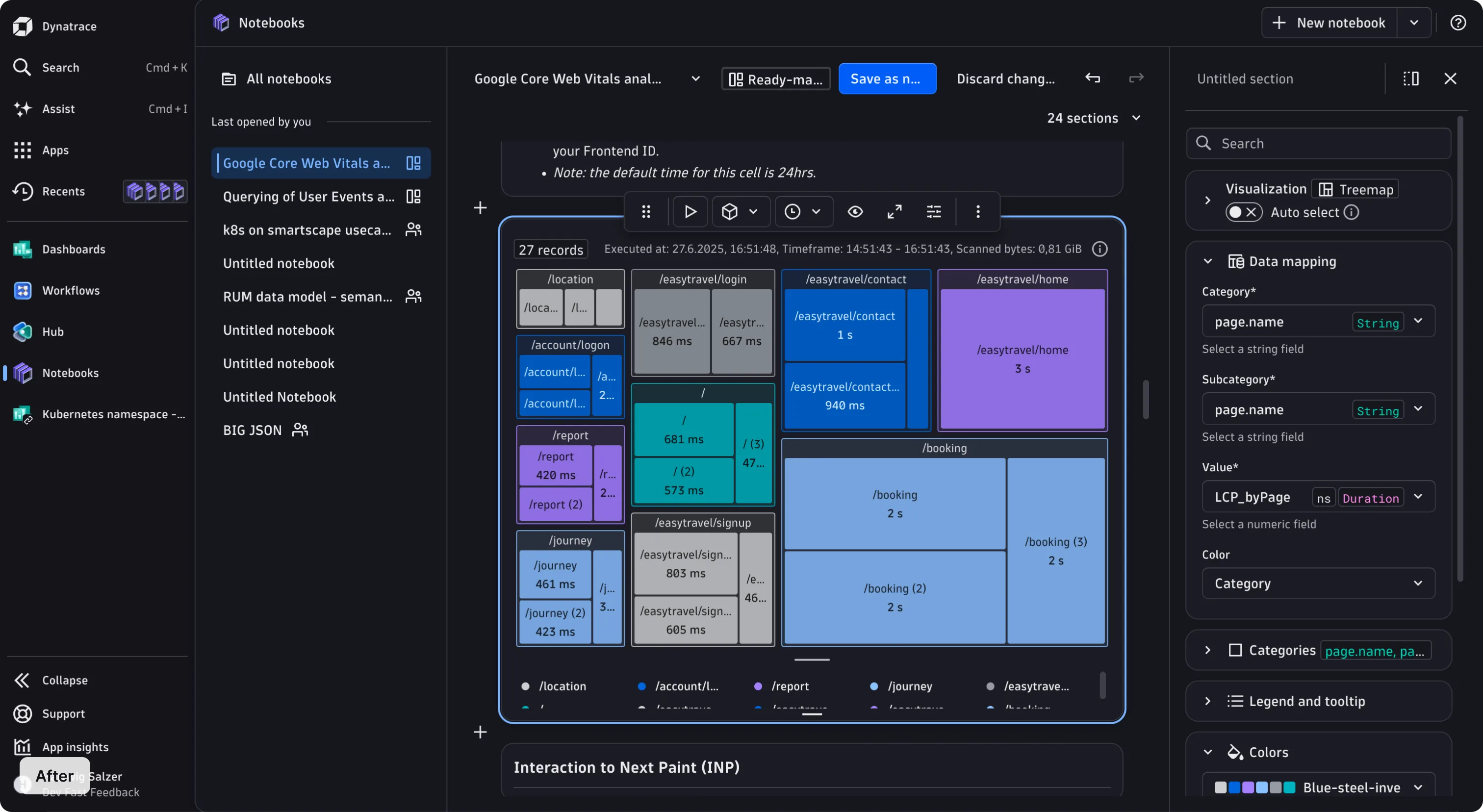
<p>This is the change you'll feel the most. Page structure used to come from
nested surfaces; it now comes from lines. Sidebars, detail panels, and
content regions sit flush on the page background, separated by thin dividers.</p>
<p>Surfaces are still there, doing the job they're best at: grouping related
content rather than carrying the page structure. With structure coming from
alignment and dividers, instead of stacked backgrounds, the interface is
calmer, dense pages are easier to scan, and a surface now genuinely means
"these things belong together."</p>
<h3 class="anchor anchorTargetStickyNavbar_u62B" id="before">Before<a href="https://public-developer.central.internal.dynatrace.com/blog/strato-visual-refresh/#before" class="hash-link" aria-label="Direct link to Before" title="Direct link to Before" translate="no">​</a></h3>
<p><img decoding="async" loading="lazy" alt="Strato components before the visual refresh" src="https://public-developer.central.internal.dynatrace.com/assets/images/visual-refresh-before-light-64c4881a1a20ad678963b474d198172d.webp#light-mode-only" width="3024" height="1656" class="img_Q_b2">
<img decoding="async" loading="lazy" alt="Strato components before the visual refresh" src="https://public-developer.central.internal.dynatrace.com/assets/images/visual-refresh-before-dark-bf388e752f3bbf50992af275ab7090d9.webp#dark-mode-only" width="3024" height="1656" class="img_Q_b2"></p>
<h3 class="anchor anchorTargetStickyNavbar_u62B" id="after">After<a href="https://public-developer.central.internal.dynatrace.com/blog/strato-visual-refresh/#after" class="hash-link" aria-label="Direct link to After" title="Direct link to After" translate="no">​</a></h3>
<p><img decoding="async" loading="lazy" alt="Strato components after the visual refresh" src="https://public-developer.central.internal.dynatrace.com/assets/images/visual-refresh-after-light-42136cd9515709c92e5bd312a42ab11b.webp#light-mode-only" width="3024" height="1656" class="img_Q_b2">
<img decoding="async" loading="lazy" alt="Strato components after the visual refresh" src="https://public-developer.central.internal.dynatrace.com/assets/images/visual-refresh-after-dark-bc3fb4f21d27667e3b5e5fb875e67204.webp#dark-mode-only" width="3024" height="1656" class="img_Q_b2"></p>
<h2 class="anchor anchorTargetStickyNavbar_u62B" id="more-vibrant-colors-cleaner-grays">More vibrant colors, cleaner grays<a href="https://public-developer.central.internal.dynatrace.com/blog/strato-visual-refresh/#more-vibrant-colors-cleaner-grays" class="hash-link" aria-label="Direct link to More vibrant colors, cleaner grays" title="Direct link to More vibrant colors, cleaner grays" translate="no">​</a></h2>
<p>Status colors are cleaner and brighter. Success, warning, and critical are now
noticeably more saturated, so a critical alert reads as urgent, at a glance, and
a success state shows the confidence it should.</p>
<p>The gray shades were rebuilt too. The whole neutral scale was regenerated from
scratch, which removes the general grayness that was there before. Dark mode
changed from heavy blue-gray to a more neutral and readable coloring.</p>
<p>Dark mode now follows the same elevation logic as light mode: the higher an
element sits, the brighter it is. Depth reads identically in both themes, so a
raised panel or a floating menu is recognizable at a glance, and dense pages
stay calm and easy to scan.</p>
<h2 class="anchor anchorTargetStickyNavbar_u62B" id="fields-that-read-as-interactive">Fields that read as interactive<a href="https://public-developer.central.internal.dynatrace.com/blog/strato-visual-refresh/#fields-that-read-as-interactive" class="hash-link" aria-label="Direct link to Fields that read as interactive" title="Direct link to Fields that read as interactive" translate="no">​</a></h2>
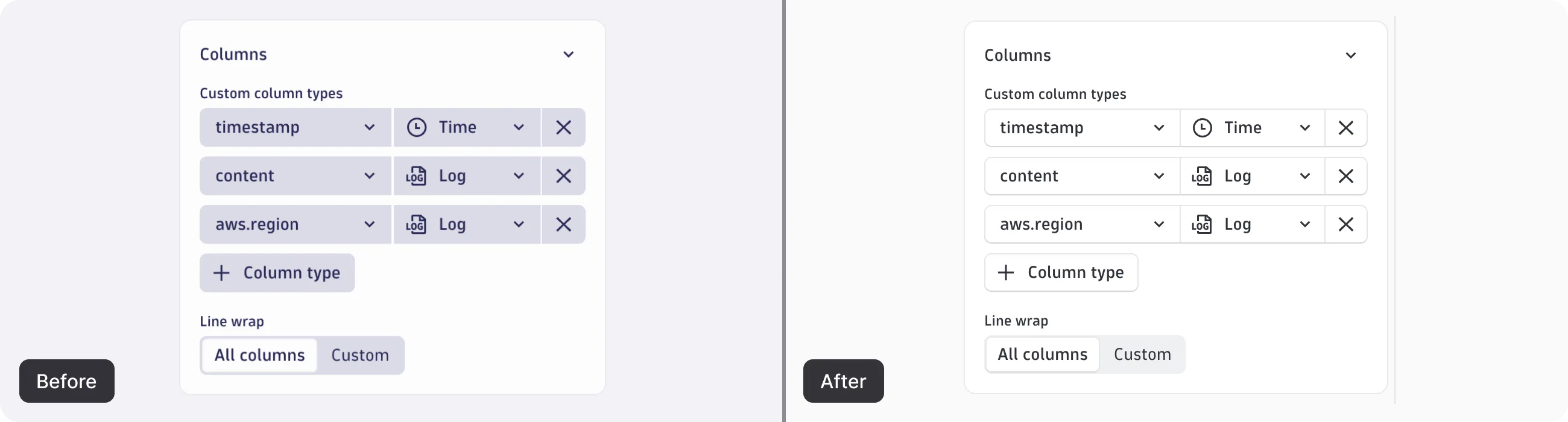
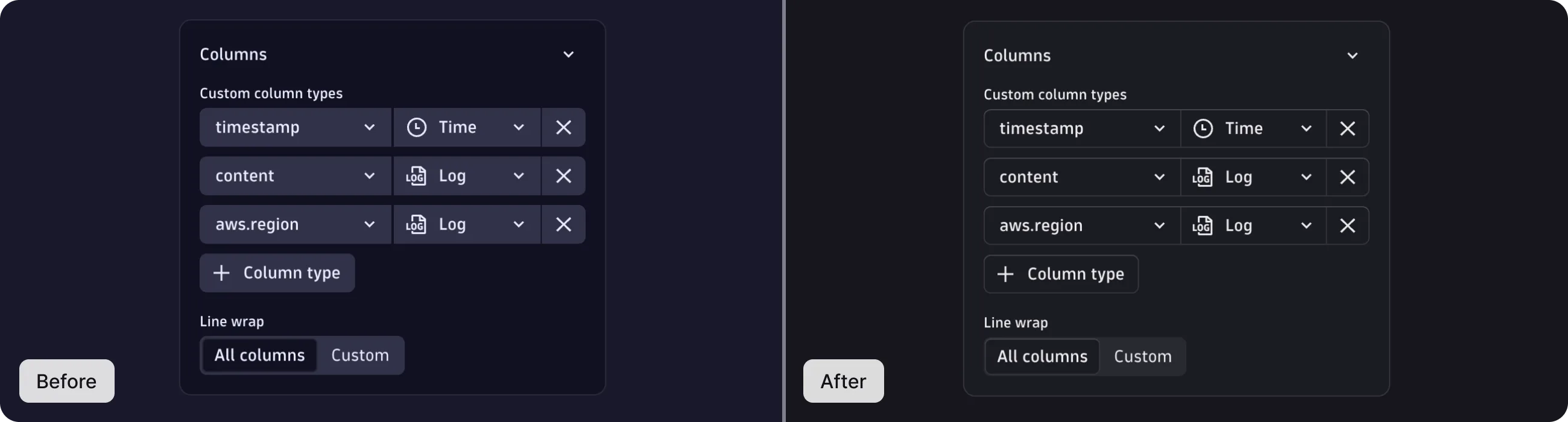
<p>Fields are now outlined and bright rather than filled. An empty field reads
immediately as somewhere you can enter text, and a form full of different
fields feels lighter and uncrowded.</p>
<p>Gray now does a more specific job. Read-only and disabled fields keep a gray
background, which makes those states unmistakable at a glance. Now, gray
reliably means "you can't edit this." Chips follow the same rule, trading
solid blocks for outlines.</p>
<p><img decoding="async" loading="lazy" alt="Column type fields before and after the visual refresh, showing filled fields replaced by outlined ones" src="https://public-developer.central.internal.dynatrace.com/assets/images/visual-refresh-column-types-light-7224bc68999c6a286ad503745a8df444.webp#light-mode-only" width="2600" height="700" class="img_Q_b2">
<img decoding="async" loading="lazy" alt="Column type fields before and after the visual refresh, showing filled fields replaced by outlined ones" src="https://public-developer.central.internal.dynatrace.com/assets/images/visual-refresh-column-types-dark-45762633d3353d4f64bdcdcef20d9e8e.webp#dark-mode-only" width="2600" height="700" class="img_Q_b2"></p>
<h2 class="anchor anchorTargetStickyNavbar_u62B" id="refreshed-chart-colors">Refreshed chart colors<a href="https://public-developer.central.internal.dynatrace.com/blog/strato-visual-refresh/#refreshed-chart-colors" class="hash-link" aria-label="Direct link to Refreshed chart colors" title="Direct link to Refreshed chart colors" translate="no">​</a></h2>
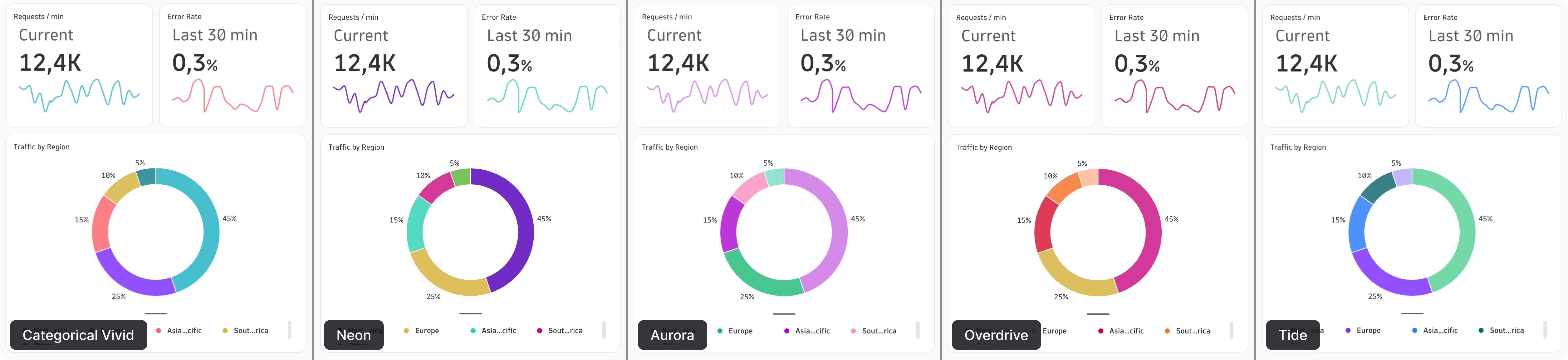
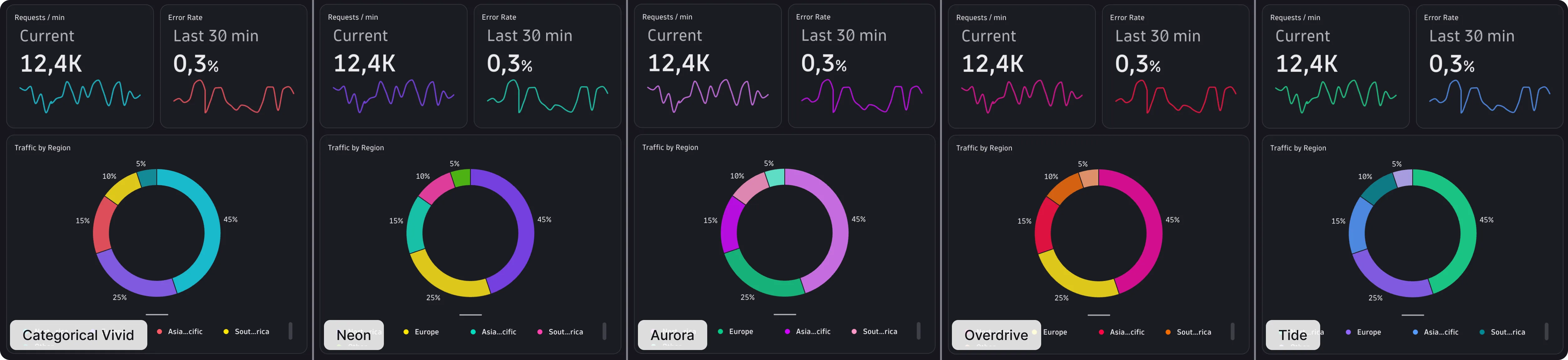
<p>Chart colors followed the UI refresh with the same intent: more vivid, more
distinct. The sequential palettes were rebuilt using the
<a href="https://developer.mozilla.org/en-US/docs/Web/CSS/Reference/Values/color_value/oklch" target="_blank" rel="noopener noreferrer" class="">OKLCH color system</a>,
a perceptually-uniform model where equal numerical steps look like equal steps
to the eye. All the other palettes are derived from these new shades.</p>
<p>The mid-range shades keep their full saturation now, so overlapping chart
series stay visually distinct even in dense charts. Charts across dashboards,
notebooks, and custom apps all pick up the new colors automatically thanks to
the Strato design tokens.</p>
<p>More chart palettes are on the way, including a vivid categorical set and
several themed palettes.</p>
<p><img decoding="async" loading="lazy" alt="The five new chart palettes: Categorical Vivid, Neon, Aurora, Overdrive, and Tide" src="https://public-developer.central.internal.dynatrace.com/assets/images/visual-refresh-chart-themes-light-2bbe2fec0df636afe5521405c63eec7d.webp#light-mode-only" width="5024" height="1152" class="img_Q_b2">
<img decoding="async" loading="lazy" alt="The five new chart palettes: Categorical Vivid, Neon, Aurora, Overdrive, and Tide" src="https://public-developer.central.internal.dynatrace.com/assets/images/visual-refresh-chart-themes-dark-419a1fd99f8baa8f9278f5f77fecaf3e.webp#dark-mode-only" width="5024" height="1152" class="img_Q_b2"></p>
<h2 class="anchor anchorTargetStickyNavbar_u62B" id="what-this-means-for-your-app">What this means for your app<a href="https://public-developer.central.internal.dynatrace.com/blog/strato-visual-refresh/#what-this-means-for-your-app" class="hash-link" aria-label="Direct link to What this means for your app" title="Direct link to What this means for your app" translate="no">​</a></h2>
<p>Nothing to migrate. The refresh ships through Strato's design tokens, so any
component you already use picks it up automatically without API changes, and
no breaking changes either.</p>
<p>If you style anything yourself, design tokens are what save you here. Token
references resolve to CSS custom properties, so anything built on them moved
along with the rest and is already up to date.</p>
<p>The spots worth a close look are hardcoded values: anywhere a color or style
was written literally to match Strato by eye, instead of referenced from a
token. Those didn't move, so they may now sit slightly out of step.</p>
<p>The refresh is live now, across every Strato app your team already ships. Take
a look at your apps today, and if something looks off, let us know through the
Feedback button at the bottom of this page.</p>]]></content>
        <category label="Strato Design System" term="Strato Design System"/>
        <category label="Design" term="Design"/>
        <category label="Data visualization" term="Data visualization"/>
    </entry>
    <entry>
        <title type="html"><![CDATA[September office hours recap, and our next session]]></title>
        <id>https://public-developer.central.internal.dynatrace.com/blog/office-hours-september-2026-recap/</id>
        <link href="https://public-developer.central.internal.dynatrace.com/blog/office-hours-september-2026-recap/"/>
        <updated>2026-09-09T00:00:00.000Z</updated>
        <summary type="html"><![CDATA[Catch up on the September App Development Office Hours—code optimization, error messages, App Toolkit updates, and more—plus our next session date.]]></summary>
        <content type="html"><![CDATA[<p>Thanks to everyone who joined the September App Development Office Hours! If you missed it, the <a href="https://www.youtube.com/watch?v=CD1GT1dwI3s" target="_blank" rel="noopener noreferrer" class="">recording is up</a> and here's a quick rundown of what we covered:</p>
<ul>
<li class="">4 new code optimization guides</li>
<li class="">A new error messages pattern</li>
<li class="">App Toolkit updates</li>
<li class="">A look ahead at Strato 4.0</li>
<li class="">An announcement about the Developer Newsletter</li>
</ul>
<p>The next session is <strong>Tuesday, November 10</strong>.</p>
<div style="position:relative;padding-bottom:56.25%;height:0;margin-bottom:1.5rem"><iframe style="position:absolute;inset:0;width:100%;height:100%" src="https://www.youtube.com/embed/CD1GT1dwI3s" title="App Development Office Hours — September 2026 recording" allow="encrypted-media" sandbox="allow-scripts allow-same-origin allow-presentation allow-popups" allowfullscreen=""></iframe></div>
<p>Here are the topics we covered, in the order they appear in the recording, with links to the documentation for each one.</p>
<h2 class="anchor anchorTargetStickyNavbar_u62B" id="new-for-app-builders">New for app builders<a href="https://public-developer.central.internal.dynatrace.com/blog/office-hours-september-2026-recap/#new-for-app-builders" class="hash-link" aria-label="Direct link to New for app builders" title="Direct link to New for app builders" translate="no">​</a></h2>
<p>New guides under <a href="https://public-developer.central.internal.dynatrace.com/develop/guides/code-optimization/" target="_blank" rel="noopener noreferrer" class="">Code optimization</a>:</p>
<ul>
<li class=""><strong>Stale-while-revalidate</strong>—serve a cached result instantly while a fresh one loads in the background, so users see data instead of a spinner. See <a href="https://public-developer.central.internal.dynatrace.com/develop/guides/code-optimization/stale-while-revalidate/" target="_blank" rel="noopener noreferrer" class="">Stale-while-revalidate</a>.</li>
<li class=""><strong>Prevent layout shift</strong>—reserve the right amount of space during loading so content below doesn't jump. See <a href="https://public-developer.central.internal.dynatrace.com/develop/guides/code-optimization/prevent-layout-shift/" target="_blank" rel="noopener noreferrer" class="">Prevent layout shift</a>.</li>
<li class=""><strong>Bundler-friendly code</strong>—3 common habits (TypeScript enums, module-level side effects, and classes) that quietly block tree-shaking in app functions. See <a href="https://public-developer.central.internal.dynatrace.com/develop/guides/code-optimization/bundler-friendly-code/" target="_blank" rel="noopener noreferrer" class="">Bundler-friendly code</a>.</li>
</ul>
<h2 class="anchor anchorTargetStickyNavbar_u62B" id="from-the-strato-design-system">From the Strato design system<a href="https://public-developer.central.internal.dynatrace.com/blog/office-hours-september-2026-recap/#from-the-strato-design-system" class="hash-link" aria-label="Direct link to From the Strato design system" title="Direct link to From the Strato design system" translate="no">​</a></h2>
<ul>
<li class=""><strong>Error messages</strong>—a new pattern covering which component to reach for (<code>EmptyState</code>, <code>HealthIndicator</code>, <code>MessageContainer</code>, or <code>Toast</code>) and 8 principles for writing error copy that helps users recover. See <a href="https://public-developer.central.internal.dynatrace.com/design/patterns/error-messages/" target="_blank" rel="noopener noreferrer" class="">Error messages</a>.</li>
<li class=""><strong>Accessibility improvements</strong>—Strato 3.11 through 3.13 shipped a batch of fixes across keyboard navigation, screen reader announcements, and accessible names on icon-only triggers. Run <code>dt-app update</code> to pick them up with no code changes. See the <a href="https://public-developer.central.internal.dynatrace.com/release-notes/design-system/components-changelog/" target="_blank" rel="noopener noreferrer" class="">components changelog</a> and <a href="https://public-developer.central.internal.dynatrace.com/design/foundations/accessibility/" target="_blank" rel="noopener noreferrer" class="">Accessibility</a>.</li>
</ul>
<h2 class="anchor anchorTargetStickyNavbar_u62B" id="app-toolkit-updates">App Toolkit updates<a href="https://public-developer.central.internal.dynatrace.com/blog/office-hours-september-2026-recap/#app-toolkit-updates" class="hash-link" aria-label="Direct link to App Toolkit updates" title="Direct link to App Toolkit updates" translate="no">​</a></h2>
<p>The <code>--hmr</code> flag now covers action and settings widgets in addition to app UIs, and 2 new scaffold commands—<code>dt-app document create</code> and <code>dt-app setting create</code>—stub out the boilerplate for you. See the <a href="https://public-developer.central.internal.dynatrace.com/release-notes/app-toolkit/" target="_blank" rel="noopener noreferrer" class="">App Toolkit release notes</a>.</p>
<h2 class="anchor anchorTargetStickyNavbar_u62B" id="plan-ahead-for-strato-40">Plan ahead for Strato 4.0<a href="https://public-developer.central.internal.dynatrace.com/blog/office-hours-september-2026-recap/#plan-ahead-for-strato-40" class="hash-link" aria-label="Direct link to Plan ahead for Strato 4.0" title="Direct link to Plan ahead for Strato 4.0" translate="no">​</a></h2>
<p>The next major Strato version (expected around end of CQ1) will require React 19, replace Jest with Vitest, and ship ES modules only. Nothing to act on today, but worth bookmarking <a href="https://public-developer.central.internal.dynatrace.com/release-notes/design-system/upcoming-changes/" target="_blank" rel="noopener noreferrer" class="">Upcoming changes</a>—and if you're still on Jest, <a href="https://public-developer.central.internal.dynatrace.com/develop/test-and-troubleshoot/test/create-unit-tests-vitest/" target="_blank" rel="noopener noreferrer" class="">Create unit tests with Vitest</a> is already published.</p>
<h2 class="anchor anchorTargetStickyNavbar_u62B" id="the-developer-newsletter-has-ended">The Developer Newsletter has ended<a href="https://public-developer.central.internal.dynatrace.com/blog/office-hours-september-2026-recap/#the-developer-newsletter-has-ended" class="hash-link" aria-label="Direct link to The Developer Newsletter has ended" title="Direct link to The Developer Newsletter has ended" translate="no">​</a></h2>
<p>The Developer Newsletter published its <a href="https://community.dynatrace.com/t5/Product-news/38-Developer-Newsletter-Farewell-Edition/ba-p/302968" target="_blank" rel="noopener noreferrer" class="">final edition (#38)</a> in August. The <a href="https://public-developer.central.internal.dynatrace.com/blog/" target="_blank" rel="noopener noreferrer" class="">What's new blog</a> is where we publish app-development news now. The archive stays online on the community.</p>
<h2 class="anchor anchorTargetStickyNavbar_u62B" id="from-the-community">From the community<a href="https://public-developer.central.internal.dynatrace.com/blog/office-hours-september-2026-recap/#from-the-community" class="hash-link" aria-label="Direct link to From the community" title="Direct link to From the community" translate="no">​</a></h2>
<p>How do you get secrets into an app function? Not with a <code>.env</code> file—those aren't picked up at runtime. Use the <strong>Credential Vault</strong> for a shared credential an admin owns, or app settings with a <code>"type": "secret"</code> property for config each installation's users supply. See <a href="https://public-developer.central.internal.dynatrace.com/develop/guides/security/manage-secrets/" target="_blank" rel="noopener noreferrer" class="">Manage secrets</a> and <a href="https://public-developer.central.internal.dynatrace.com/develop/guides/data/store-app-settings/" target="_blank" rel="noopener noreferrer" class="">Store app settings</a>.</p>
<h2 class="anchor anchorTargetStickyNavbar_u62B" id="next-session">Next session<a href="https://public-developer.central.internal.dynatrace.com/blog/office-hours-september-2026-recap/#next-session" class="hash-link" aria-label="Direct link to Next session" title="Direct link to Next session" translate="no">​</a></h2>
<p>The next App Development Office Hours is <strong>Tuesday, November 10</strong>, 4:00 PM CET / 10:00 AM EST. Registration isn't open yet—we'll share the event on <a href="https://www.linkedin.com/company/dynatrace" target="_blank" rel="noopener noreferrer" class="">LinkedIn</a> closer to the date, and you'll be able to sign up there.</p>
<div class="dtAdmonition_gWjT note_Kz9_"><div class="dtAdmonitionIcon_jo_B"><svg focusable="false" role="img" aria-hidden="true" fill="currentColor" width="20" height="20" xmlns="http://www.w3.org/2000/svg" viewBox="0 0 20 20" data-iconname="InformationIcon"><path d="M10.75 9v5h-1.5V9z"></path><path d="M10 8a1 1 0 1 0 0-2 1 1 0 0 0 0 2"></path><path d="M10 18a8 8 0 1 1 0-16 8 8 0 0 1 0 16m-6.5-8a6.5 6.5 0 1 0 13 0 6.5 6.5 0 0 0-13 0"></path></svg></div><div class="dtAdmonitionContent__URv"><div class="dtAdmonitionHeader_ql5F">Note</div><div><p>Got a topic you'd like us to cover? Drop it in the <a href="https://community.dynatrace.com/t5/Developer-Q-A-Forum/bd-p/devs_qanda" target="_blank" rel="noopener noreferrer" class="">Developer Q&amp;A Forum</a>.</p></div></div></div>]]></content>
        <category label="Office Hours" term="Office Hours"/>
        <category label="Dynatrace Community" term="Dynatrace Community"/>
        <category label="Release" term="Release"/>
    </entry>
    <entry>
        <title type="html"><![CDATA[App toolkit now runs on Vite, with HMR dev server and code splitting]]></title>
        <id>https://public-developer.central.internal.dynatrace.com/blog/dt-app-vite/</id>
        <link href="https://public-developer.central.internal.dynatrace.com/blog/dt-app-vite/"/>
        <updated>2026-07-27T00:00:00.000Z</updated>
        <summary type="html"><![CDATA[The dt-app CLI now runs on Vite; hot module replacement for instant dev feedback, plus code splitting for smaller production bundles and faster apps.]]></summary>
        <content type="html"><![CDATA[<p>The Dynatrace App Toolkit has a new engine under the hood: <strong>Vite</strong>. This new engine replaces the custom dev server built on esbuild and Fastify, and it powers a new optimized production build. For you, that means hot module replacement (HMR) while you develop and further optimizations for production builds, including code splitting for smaller bundles and faster apps. Check out <a href="https://public-developer.central.internal.dynatrace.com/develop/guides/code-optimization/" target="_blank" rel="noopener noreferrer" class="">Code optimization</a> for detailed guidance on improving your app's performance.</p>
<h2 class="anchor anchorTargetStickyNavbar_u62B" id="why-vite">Why Vite<a href="https://public-developer.central.internal.dynatrace.com/blog/dt-app-vite/#why-vite" class="hash-link" aria-label="Direct link to Why Vite" title="Direct link to Why Vite" translate="no">​</a></h2>
<p>The old dev server was one of the oldest, most interconnected parts of the toolchain, and esbuild's plugin model made it brittle to extend. Plugins weren't chainable and each file could pass through only one loader, which caused friction for features like i18n combined with vanilla-extract. Adding support for common tooling such as Sass meant hand-rolling it in the build.</p>
<p>Vite solves this the way the rest of the ecosystem already has—Angular, SolidStart, Remix, Astro, and React's own recommended setup all build on it. Its Rollup-compatible plugin system gives you a huge catalog of integrations out of the box, and it leaves the toolchain far easier to maintain and evolve. The migration also moved the toolchain onto Vite 8 with Rolldown support, keeping it aligned with where the ecosystem is heading.</p>
<h2 class="anchor anchorTargetStickyNavbar_u62B" id="instant-feedback-with-hmr">Instant feedback with HMR<a href="https://public-developer.central.internal.dynatrace.com/blog/dt-app-vite/#instant-feedback-with-hmr" class="hash-link" aria-label="Direct link to Instant feedback with HMR" title="Direct link to Instant feedback with HMR" translate="no">​</a></h2>
<p>Run the dev server with the new <code>--hmr</code> flag and you get two immediate wins: the server starts significantly faster, and edits show up in the browser instantly, <strong>without a full-page reload</strong>:</p>
<div class="language-bash codeBlockContainer_nJHR theme-code-block" style="--prism-color:#393A34;--prism-background-color:#f6f8fa"><div class="codeBlockContent_vJMv"><pre tabindex="0" class="prism-code language-bash codeBlock_MF_r thin-scrollbar" style="color:#393A34;background-color:#f6f8fa"><code class="codeBlockLines_IglO"><div class="token-line code-block-terminal-command" style="color:#393A34"><span class="token plain">npx dt-app dev </span><span class="token parameter variable" style="color:#36acaa">--hmr</span><br></div></code></pre></div></div>
<p>Because the page never reloads, your app keeps its state across edits, so you stay in flow instead of clicking your way back to where you were. Fastify is gone from this path, source maps still work exactly as before, and breakpoints still hit—so debugging is unchanged. HMR works for the app UI as well as for Workflow and Settings widgets.</p>
<h2 class="anchor anchorTargetStickyNavbar_u62B" id="smaller-production-bundles-with-code-splitting">Smaller production bundles with code splitting<a href="https://public-developer.central.internal.dynatrace.com/blog/dt-app-vite/#smaller-production-bundles-with-code-splitting" class="hash-link" aria-label="Direct link to Smaller production bundles with code splitting" title="Direct link to Smaller production bundles with code splitting" translate="no">​</a></h2>
<p>The new production build is opt-in behind the <code>--optimize</code> flag, which is available on the <code>build</code>, <code>deploy</code>, and <code>analyze</code> commands. Add <code>--enable-code-splitting</code> to break your bundle into chunks that load on demand instead of shipping everything upfront:</p>
<div class="language-bash codeBlockContainer_nJHR theme-code-block" style="--prism-color:#393A34;--prism-background-color:#f6f8fa"><div class="codeBlockContent_vJMv"><pre tabindex="0" class="prism-code language-bash codeBlock_MF_r thin-scrollbar" style="color:#393A34;background-color:#f6f8fa"><code class="codeBlockLines_IglO"><div class="token-line code-block-terminal-command" style="color:#393A34"><span class="token plain">npx dt-app build </span><span class="token parameter variable" style="color:#36acaa">--optimize</span><span class="token plain"> --enable-code-splitting</span><br></div><div class="token-line code-block-terminal-command" style="color:#393A34"><span class="token plain">npx dt-app deploy </span><span class="token parameter variable" style="color:#36acaa">--optimize</span><span class="token plain"> --enable-code-splitting</span><br></div></code></pre></div></div>
<p>When code splitting is on, the build automatically splits lazy loaded components into their own chunks. The build splits CSS the same way. If you use vanilla-extract, it keeps working, though you might need its dedicated Vite plugin. You don't create a <code>vite.config.js</code> — the toolkit manages Vite configuration internally.</p>
<p>Check out the <a href="https://public-developer.central.internal.dynatrace.com/develop/guides/code-optimization/lazy-loading-quickstart/" target="_blank" rel="noopener noreferrer" class="">Lazy loading quickstart</a> for a step-by-step guide to converting your routes and heavy components to lazy loading. The <a href="https://public-developer.central.internal.dynatrace.com/develop/guides/code-optimization/lazy-loading/" target="_blank" rel="noopener noreferrer" class="">Understand lazy loading</a> guide explains the principles and provides more detailed guidance.</p>
<h2 class="anchor anchorTargetStickyNavbar_u62B" id="whats-next">What's next<a href="https://public-developer.central.internal.dynatrace.com/blog/dt-app-vite/#whats-next" class="hash-link" aria-label="Direct link to What's next" title="Direct link to What's next" translate="no">​</a></h2>
<p>These features are opt-in for now, but that's changing. In the near future, Vite will be the default engine for all <code>dt-app</code> commands—no flags required. Stay tuned for more updates.</p>]]></content>
        <category label="App" term="App"/>
        <category label="Feature" term="Feature"/>
        <category label="DevOps" term="DevOps"/>
    </entry>
    <entry>
        <title type="html"><![CDATA[New pattern to design effective error messages]]></title>
        <id>https://public-developer.central.internal.dynatrace.com/blog/error-messages-pattern/</id>
        <link href="https://public-developer.central.internal.dynatrace.com/blog/error-messages-pattern/"/>
        <updated>2026-07-23T00:00:00.000Z</updated>
        <summary type="html"><![CDATA[The new pattern brings cross-component guidance for designing error messages that are clear, consistent, and helpful.]]></summary>
        <content type="html"><![CDATA[<p>A good error message can turn a dead end into a recoverable step. The new <a href="https://public-developer.central.internal.dynatrace.com/design/patterns/error-messages/" target="_blank" rel="noopener noreferrer" class="">Error messages</a> pattern brings together everything you need to design clear, consistent error messages across your app, whatever component you're working with.</p>
<h2 class="anchor anchorTargetStickyNavbar_u62B" id="start-with-the-right-component-or-pattern">Start with the right component or pattern<a href="https://public-developer.central.internal.dynatrace.com/blog/error-messages-pattern/#start-with-the-right-component-or-pattern" class="hash-link" aria-label="Direct link to Start with the right component or pattern" title="Direct link to Start with the right component or pattern" translate="no">​</a></h2>
<p>Where and when you show an error matters as much as the words you use. A field validation error, a <code>Toast</code>, and a <code>MessageContainer</code> can all communicate failure, but with different weight and urgency. The pattern gives you a shared starting point: which component to reach for, how to match the visual weight to the severity, and where to place the message so it's as close to the problem as possible.</p>
<p>That consistency adds up. Across teams and features, a common approach means users get a predictable experience no matter what went wrong.</p>
<h2 class="anchor anchorTargetStickyNavbar_u62B" id="write-effective-copy">Write effective copy<a href="https://public-developer.central.internal.dynatrace.com/blog/error-messages-pattern/#write-effective-copy" class="hash-link" aria-label="Direct link to Write effective copy" title="Direct link to Write effective copy" translate="no">​</a></h2>
<p>The pattern covers key principles for writing effective error messages, each with a side-by-side do/don't example drawn from real Dynatrace UI copy:</p>
<ul>
<li class="">Use simple words</li>
<li class="">Be specific</li>
<li class="">Show a way forward</li>
<li class="">Skip obvious next steps</li>
<li class="">Avoid generic errors or raw codes</li>
<li class="">Don't assign blame</li>
<li class="">Don't be overly apologetic</li>
<li class="">Don't exaggerate or downplay</li>
</ul>
<p>These principles also make a good prompt checklist when you're using an LLM to generate or review error copy. Pattern pages are designed to be the foundation your content is built on, so you can scale without losing consistency.</p>
<p>Read the full pattern in the <a href="https://public-developer.central.internal.dynatrace.com/design/patterns/error-messages/" target="_blank" rel="noopener noreferrer" class="">Error messages</a> reference.</p>]]></content>
        <category label="Design" term="Design"/>
        <category label="Documentation" term="Documentation"/>
        <category label="Strato Design System" term="Strato Design System"/>
    </entry>
    <entry>
        <title type="html"><![CDATA[PageLayout: a composable app layout]]></title>
        <id>https://public-developer.central.internal.dynatrace.com/blog/pagelayout-component/</id>
        <link href="https://public-developer.central.internal.dynatrace.com/blog/pagelayout-component/"/>
        <updated>2026-07-14T00:00:00.000Z</updated>
        <summary type="html"><![CDATA[PageLayout is the new, more flexible replacement for Page, with composable slots that work anywhere and a split-or-overlay details panel.]]></summary>
        <content type="html"><![CDATA[<p><code>PageLayout</code> is the new Strato layout component and the more flexible successor to <code>Page</code>. It keeps the familiar slot-based structure (header, sidebar, content, and details) while giving you more freedom in how you compose and control those panels. <code>Page</code> still works, so you can migrate at your own pace.</p>
<h2 class="anchor anchorTargetStickyNavbar_u62B" id="composable-slots">Composable slots<a href="https://public-developer.central.internal.dynatrace.com/blog/pagelayout-component/#composable-slots" class="hash-link" aria-label="Direct link to Composable slots" title="Direct link to Composable slots" translate="no">​</a></h2>
<p>The headline change is that slots are <strong>composable</strong>: <code>Header</code>, <code>Sidebar</code>, <code>Content</code>, and <code>Details</code> can live anywhere in your component tree—inside an <code>&lt;Outlet /&gt;</code>, a <code>&lt;Suspense&gt;</code> boundary, or any wrapper—instead of having to be direct children. That's what makes it work cleanly with routers, where the layout frame and the routed content can own different slots. Beyond that, panel state is preserved across collapse and expand, the details panel can render side-by-side or as an overlay, and panels are responsive with their own breakpoints.</p>
<h2 class="anchor anchorTargetStickyNavbar_u62B" id="migrating-from-page">Migrating from Page<a href="https://public-developer.central.internal.dynatrace.com/blog/pagelayout-component/#migrating-from-page" class="hash-link" aria-label="Direct link to Migrating from Page" title="Direct link to Migrating from Page" translate="no">​</a></h2>
<p>Most of the migration is mechanical, so you just need to rename the slots and a few props. A few APIs changed along the way (expand/collapse controls are always on, content always stays mounted) and the default breakpoints are different, so review any breakpoint overrides after you switch.</p>
<p>Start with the <a href="https://public-developer.central.internal.dynatrace.com/design/components/layouts/PageLayout/" target="_blank" rel="noopener noreferrer" class="">PageLayout component</a> and the <a href="https://public-developer.central.internal.dynatrace.com/design/components/layouts/PageLayout/migration/" target="_blank" rel="noopener noreferrer" class="">migration guide</a>.</p>]]></content>
        <category label="Strato Design System" term="Strato Design System"/>
        <category label="Design" term="Design"/>
        <category label="Feature" term="Feature"/>
    </entry>
    <entry>
        <title type="html"><![CDATA[July office hours recap, and our next session]]></title>
        <id>https://public-developer.central.internal.dynatrace.com/blog/office-hours-july-2026-recap/</id>
        <link href="https://public-developer.central.internal.dynatrace.com/blog/office-hours-july-2026-recap/"/>
        <updated>2026-07-07T00:00:00.000Z</updated>
        <summary type="html"><![CDATA[A recap of the July App Development Office Hours — page titles, PageLayout, lazy loading, and more — plus the date for our next session.]]></summary>
        <content type="html"><![CDATA[<p>Thanks to everyone who joined the July App Development Office Hours! If you missed it, the <a href="https://www.youtube.com/watch?v=ZwNAnSgzWEM" target="_blank" rel="noopener noreferrer" class="">recording is up</a> and here's a quick rundown of what we covered: new features for app builders, the latest design-system additions, and questions from the community. The next session is <strong>Tuesday, September 8</strong>.</p>
<div style="position:relative;padding-bottom:56.25%;height:0;margin-bottom:1.5rem"><iframe style="position:absolute;inset:0;width:100%;height:100%" src="https://www.youtube.com/embed/ZwNAnSgzWEM" title="App Development Office Hours — July 2026 recording" allow="encrypted-media" sandbox="allow-scripts allow-same-origin allow-presentation allow-popups" allowfullscreen=""></iframe></div>
<h2 class="anchor anchorTargetStickyNavbar_u62B" id="new-for-app-builders">New for app builders<a href="https://public-developer.central.internal.dynatrace.com/blog/office-hours-july-2026-recap/#new-for-app-builders" class="hash-link" aria-label="Direct link to New for app builders" title="Direct link to New for app builders" translate="no">​</a></h2>
<ul>
<li class=""><strong>Custom page titles</strong>—set a descriptive browser-tab title with the <code>usePageTitle</code> hook, so users can tell multiple open tabs apart. See <a href="https://public-developer.central.internal.dynatrace.com/develop/guides/navigation/page-titles/" target="_blank" rel="noopener noreferrer" class="">Page titles</a>.</li>
<li class=""><strong>Lazy loading</strong>—a deeper guide on code splitting, route- and view-based lazy loading, when not to split, and how to parallelize a chunk download with its Grail query. See <a href="https://public-developer.central.internal.dynatrace.com/develop/guides/code-optimization/lazy-loading/" target="_blank" rel="noopener noreferrer" class="">Understand lazy loading</a>.</li>
</ul>
<h2 class="anchor anchorTargetStickyNavbar_u62B" id="from-the-strato-design-system">From the Strato design system<a href="https://public-developer.central.internal.dynatrace.com/blog/office-hours-july-2026-recap/#from-the-strato-design-system" class="hash-link" aria-label="Direct link to From the Strato design system" title="Direct link to From the Strato design system" translate="no">​</a></h2>
<ul>
<li class=""><strong>PageLayout</strong>—the new, more flexible replacement for <code>Page</code>, with composable slots and a split-or-overlay details panel. See the <a href="https://public-developer.central.internal.dynatrace.com/design/components/layouts/PageLayout/" target="_blank" rel="noopener noreferrer" class="">PageLayout component</a> and its <a href="https://public-developer.central.internal.dynatrace.com/design/components/layouts/PageLayout/migration/" target="_blank" rel="noopener noreferrer" class="">migration guide</a>.</li>
<li class=""><strong>Accessibility foundation</strong>—a new design-foundation page covering what you need to build inclusive apps — WCAG 2.2 AA, and what Strato handles for you. See <a href="https://public-developer.central.internal.dynatrace.com/design/foundations/accessibility/" target="_blank" rel="noopener noreferrer" class="">Accessibility</a>.</li>
<li class=""><strong>TimeframeSelector</strong>—from <code>@dynatrace/strato-components</code> v3.1+, it shows users their recently used timeframes automatically — no code changes required. See <a href="https://public-developer.central.internal.dynatrace.com/design/components/filters/TimeframeSelector/" target="_blank" rel="noopener noreferrer" class="">TimeframeSelector</a>.</li>
<li class=""><strong>XYChart</strong>—a low-level, composable option for charts the ready-made components can't build — heatmaps, scatterplots, and more. See <a href="https://public-developer.central.internal.dynatrace.com/design/data-visualizations/charts/XYChart/" target="_blank" rel="noopener noreferrer" class="">XYChart</a>.</li>
</ul>
<h2 class="anchor anchorTargetStickyNavbar_u62B" id="from-the-community">From the community<a href="https://public-developer.central.internal.dynatrace.com/blog/office-hours-july-2026-recap/#from-the-community" class="hash-link" aria-label="Direct link to From the community" title="Direct link to From the community" translate="no">​</a></h2>
<p>One thread we highlighted: a user asked whether they could set a <a href="https://community.dynatrace.com/t5/Developer-Q-A-Forum/Can-I-have-a-custom-page-title-in-a-Dynatrace-App/td-p/288101" target="_blank" rel="noopener noreferrer" class="">custom page title in a Dynatrace app</a>. It was on the roadmap then, and it's now shipped, with the <code>usePageTitle</code> hook above. Your questions genuinely feed what we prioritize.</p>
<h2 class="anchor anchorTargetStickyNavbar_u62B" id="next-session">Next session<a href="https://public-developer.central.internal.dynatrace.com/blog/office-hours-july-2026-recap/#next-session" class="hash-link" aria-label="Direct link to Next session" title="Direct link to Next session" translate="no">​</a></h2>
<p>The next App Development Office Hours is <strong>Tuesday, September 8, 16:00 CEST / 10:00 EDT</strong>. Register via the <a href="https://www.linkedin.com/feed/update/urn:li:activity:7492569065681530880" target="_blank" rel="noopener noreferrer" class="">LinkedIn event</a>.</p>
<p>Got a topic you'd like us to cover? Drop it in the <a href="https://community.dynatrace.com/t5/Developer-Q-A-Forum/bd-p/devs_qanda" target="_blank" rel="noopener noreferrer" class="">Developer Q&amp;A Forum</a>.</p>]]></content>
        <category label="Office Hours" term="Office Hours"/>
        <category label="Dynatrace Community" term="Dynatrace Community"/>
        <category label="Release" term="Release"/>
    </entry>
    <entry>
        <title type="html"><![CDATA[Two guides for faster apps: lazy loading and SWR]]></title>
        <id>https://public-developer.central.internal.dynatrace.com/blog/app-performance-guides/</id>
        <link href="https://public-developer.central.internal.dynatrace.com/blog/app-performance-guides/"/>
        <updated>2026-07-06T00:00:00.000Z</updated>
        <summary type="html"><![CDATA[Two new guides on making Dynatrace apps feel fast: lazy loading to cut initial load time, and stale-while-revalidate to keep navigation instant.]]></summary>
        <content type="html"><![CDATA[<p>Two new performance guides are live, and they tackle the same goal from opposite ends: ship less upfront, and reuse what you've already fetched. Lazy loading splits your bundle so the browser only downloads the code for the view in front of the user. Stale-while-revalidate serves cached Grail results instantly while refreshing them in the background. Together they cover both first load and every navigation after it.</p>
<h2 class="anchor anchorTargetStickyNavbar_u62B" id="lazy-loading-ship-less-upfront">Lazy loading: ship less upfront<a href="https://public-developer.central.internal.dynatrace.com/blog/app-performance-guides/#lazy-loading-ship-less-upfront" class="hash-link" aria-label="Direct link to Lazy loading: ship less upfront" title="Direct link to Lazy loading: ship less upfront" translate="no">​</a></h2>
<p>By default, an app bundles every page and component into one download, even the ones the user never opens. Lazy loading splits that bundle into chunks that load on demand, using React's <code>lazy()</code> and <code>&lt;Suspense&gt;</code>. The App Toolkit now supports this out of the box.</p>
<p>The highest-impact, lowest-risk place to start is the route level: load only the page the user navigates to. From there, you can defer in-page views that sit behind an interaction (tabs, drawers, modals), and even fire a Grail query while the browser is still downloading the component that will render it. The guide also covers where <strong>not</strong> to split: anything above the fold, or smaller than ~20–30 KB, usually isn't worth a separate chunk.</p>
<div class="dtAdmonition_gWjT tip_pbuZ"><div class="dtAdmonitionIcon_jo_B"><svg focusable="false" role="img" aria-hidden="true" fill="currentColor" width="20" height="20" xmlns="http://www.w3.org/2000/svg" viewBox="0 0 20 20" data-iconname="IdeaIcon"><path d="M10.75 3V.5h-1.5V3z"></path><path d="M13.482 4.018 15.25 2.25l1.06 1.06-1.767 1.768z"></path><path d="M14.496 8.996a4.5 4.5 0 0 1-2.124 3.822v1.18a1 1 0 0 1-1 1H8.62a1 1 0 0 1-1-1v-1.18a4.5 4.5 0 1 1 6.876-3.822m-3.623 2.87a3.001 3.001 0 0 0-.877-5.87 3 3 0 0 0-.87 5.872v1.63h1.747z"></path><path d="M7.625 17.238a.75.75 0 0 1 .75-.75h3.25a.75.75 0 0 1 0 1.5h-3.25a.75.75 0 0 1-.75-.75"></path><path d="M4.25 6.5h-2.5V8h2.5z"></path><path d="M18.25 6.5h-2.5V8h2.5z"></path><path d="m4.75 2.25 1.768 1.768-1.06 1.06-1.769-1.767z"></path></svg></div><div class="dtAdmonitionContent__URv"><div class="dtAdmonitionHeader_ql5F">Tip</div><div><p>Read about how to <a href="https://public-developer.central.internal.dynatrace.com/develop/guides/code-optimization/lazy-loading/" target="_blank" rel="noopener noreferrer" class="">Understand lazy loading</a>.</p></div></div></div>
<h2 class="anchor anchorTargetStickyNavbar_u62B" id="stale-while-revalidate-reuse-what-youve-fetched">Stale-while-revalidate: reuse what you've fetched<a href="https://public-developer.central.internal.dynatrace.com/blog/app-performance-guides/#stale-while-revalidate-reuse-what-youve-fetched" class="hash-link" aria-label="Direct link to Stale-while-revalidate: reuse what you've fetched" title="Direct link to Stale-while-revalidate: reuse what you've fetched" translate="no">​</a></h2>
<p>Grail queries can take seconds, and much of the data an app shows such as host lists, topology, or configuration, doesn't change second to second. Stale-while-revalidate (SWR) renders cached data instantly, then quietly refreshes it in the background and swaps in the new result if anything changed. No spinner, no blank screen.</p>
<p>You mostly get this for free: <code>useDql</code> from <code>@dynatrace-sdk/react-hooks</code> is built on TanStack Query and ships with SWR support. The guide walks through setting <code>staleTime</code> per data type, using <code>placeholderData</code> to avoid a flash of loading state on filter changes, and the key distinction between <code>isLoading</code> (first load) and <code>isFetching</code> (background refresh).</p>
<div class="dtAdmonition_gWjT tip_pbuZ"><div class="dtAdmonitionIcon_jo_B"><svg focusable="false" role="img" aria-hidden="true" fill="currentColor" width="20" height="20" xmlns="http://www.w3.org/2000/svg" viewBox="0 0 20 20" data-iconname="IdeaIcon"><path d="M10.75 3V.5h-1.5V3z"></path><path d="M13.482 4.018 15.25 2.25l1.06 1.06-1.767 1.768z"></path><path d="M14.496 8.996a4.5 4.5 0 0 1-2.124 3.822v1.18a1 1 0 0 1-1 1H8.62a1 1 0 0 1-1-1v-1.18a4.5 4.5 0 1 1 6.876-3.822m-3.623 2.87a3.001 3.001 0 0 0-.877-5.87 3 3 0 0 0-.87 5.872v1.63h1.747z"></path><path d="M7.625 17.238a.75.75 0 0 1 .75-.75h3.25a.75.75 0 0 1 0 1.5h-3.25a.75.75 0 0 1-.75-.75"></path><path d="M4.25 6.5h-2.5V8h2.5z"></path><path d="M18.25 6.5h-2.5V8h2.5z"></path><path d="m4.75 2.25 1.768 1.768-1.06 1.06-1.769-1.767z"></path></svg></div><div class="dtAdmonitionContent__URv"><div class="dtAdmonitionHeader_ql5F">Tip</div><div><p>Read more about <a href="https://public-developer.central.internal.dynatrace.com/develop/guides/code-optimization/stale-while-revalidate/" target="_blank" rel="noopener noreferrer" class="">Stale-While-Revalidate (SWR)</a>.</p></div></div></div>
<h2 class="anchor anchorTargetStickyNavbar_u62B" id="why-both-matter">Why both matter<a href="https://public-developer.central.internal.dynatrace.com/blog/app-performance-guides/#why-both-matter" class="hash-link" aria-label="Direct link to Why both matter" title="Direct link to Why both matter" translate="no">​</a></h2>
<p>The two techniques map neatly onto Core Web Vitals: lazy loading reduces the JavaScript the browser parses before first render, which helps <strong>LCP</strong>; while SWR removes loading states from repeat navigation, which helps <strong>INP</strong>.</p>]]></content>
        <category label="App" term="App"/>
        <category label="Feature" term="Feature"/>
        <category label="SDK" term="SDK"/>
    </entry>
    <entry>
        <title type="html"><![CDATA[Set custom browser-tab titles for your apps]]></title>
        <id>https://public-developer.central.internal.dynatrace.com/blog/custom-page-titles/</id>
        <link href="https://public-developer.central.internal.dynatrace.com/blog/custom-page-titles/"/>
        <updated>2026-06-17T00:00:00.000Z</updated>
        <summary type="html"><![CDATA[Apps can now set descriptive browser-tab titles with the usePageTitle hook, so users can tell multiple open tabs of the same app apart at a glance.]]></summary>
        <content type="html"><![CDATA[<p>Users often keep several tabs of the same app open: different filters, different entities, etc. Until now every tab showed the same title, but now apps can set a descriptive browser-tab title so each tab describes what it actually shows.</p>
<h2 class="anchor anchorTargetStickyNavbar_u62B" id="whats-changing">What's changing<a href="https://public-developer.central.internal.dynatrace.com/blog/custom-page-titles/#whats-changing" class="hash-link" aria-label="Direct link to What's changing" title="Direct link to What's changing" translate="no">​</a></h2>
<p>You add a small <code>usePageTitle</code> hook to your project and call it from each routed page. The app shell composes the rest of the tab title (app name, tenant, "Dynatrace") around the part you set. One thing to watch: only set a title for views with a <strong>persistent URL</strong> — updating it for transient overlays or modals confuses the browser's back/forward history.</p>
<p>The <a href="https://public-developer.central.internal.dynatrace.com/develop/guides/navigation/page-titles/" target="_blank" rel="noopener noreferrer" class="">Page titles guide</a> has the full walkthrough, including the hook itself and how to set titles for widgets.</p>
<h2 class="anchor anchorTargetStickyNavbar_u62B" id="community-works">Community works<a href="https://public-developer.central.internal.dynatrace.com/blog/custom-page-titles/#community-works" class="hash-link" aria-label="Direct link to Community works" title="Direct link to Community works" translate="no">​</a></h2>
<p>This one closed a loop with the community — it started as a <a href="https://community.dynatrace.com/t5/Developer-Q-A-Forum/Can-I-have-a-custom-page-title-in-a-Dynatrace-App/td-p/288101" target="_blank" rel="noopener noreferrer" class="">question on the Developer Q&amp;A forum</a>. If there's something you're missing, that's a good place to ask.</p>]]></content>
        <category label="App" term="App"/>
        <category label="Feature" term="Feature"/>
        <category label="SDK" term="SDK"/>
    </entry>
    <entry>
        <title type="html"><![CDATA[Hot off the press: Dynatrace Developer gets a blog]]></title>
        <id>https://public-developer.central.internal.dynatrace.com/blog/whats-new-launch/</id>
        <link href="https://public-developer.central.internal.dynatrace.com/blog/whats-new-launch/"/>
        <updated>2026-06-16T00:00:00.000Z</updated>
        <summary type="html"><![CDATA[Dynatrace Developer now has a blog with news and updates for Dynatrace app creators, all in one searchable, filterable place.]]></summary>
        <content type="html"><![CDATA[<p>If you've ever learned about important app development news from a four-times-forwarded Slack post, or an offsides comment in a meeting, this blog is for you.</p>
<p><strong>What's new</strong> is the new home for app developer news on Dynatrace Developer. It's a single, searchable, filterable feed of news worth knowing, without all the channel-hopping.</p>
<h2 class="anchor anchorTargetStickyNavbar_u62B" id="what-youll-find-here">What you'll find here<a href="https://public-developer.central.internal.dynatrace.com/blog/whats-new-launch/#what-youll-find-here" class="hash-link" aria-label="Direct link to What you'll find here" title="Direct link to What you'll find here" translate="no">​</a></h2>
<p>This isn't a changelog—you'll still find those in <a href="https://public-developer.central.internal.dynatrace.com/release-notes" target="_blank" rel="noopener noreferrer" class="">Release notes</a>.</p>
<p>In <strong>What's new</strong>, you can expect a steady mix of updates about new features and ideas, interesting events and tools for your work, plus lots of other topics that matter to app creators.</p>
<p>Today, you see the MVP. More features are coming soon. Use the feedback button at the bottom of the page to tell us what you want more of (or less of).</p>]]></content>
        <category label="Dynatrace Developer" term="Dynatrace Developer"/>
        <category label="Feature" term="Feature"/>
        <category label="Release" term="Release"/>
    </entry>
</feed>